KEEMUX
DVI KVM Switch
1대의 모니터와 키보드, 마우스로 2~4대의 컴퓨터 제어
RS-232 리모트 컨트롤
DVI포트 연결 DVI KVM Switch
Control multiple single link DVI-enabled PCs from one PS/2 keyboard, PS/2 mouse and DVI monitor.
Also known as: DVI KVM switch, 2 port PC Switch for DVI Flat Panel Display Monitors, keyboard DVI monitor mouse switch.

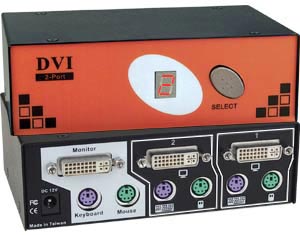
KEEMUX-PD-2 (Front & Back) |

KEEMUX-P2D-2 (Front & Back) |

KEEMUX-P2D-4 (Front & Back) |
Features & Applications |
The KEEMUX® DVI KVM switch allows you to control multiple single link DVI-enabled PCs with one DVI monitor, PS/2 keyboard and PS/2 mouse.
- Dual monitor DVI KVM switch is available.
- All attached PCs can be booted simultaneously.
- 1600x1200 video resolution.
|
- Supports DVI interface for crisp and clear video quality on Flat Panel Display.
- Front-panel push button and hotkeys for channel selection.
- LED display on switch shows which port is active.
- Auto Scan all PCs to catch system failures early.
- Rugged metal enclosure.
|
Specifications |
Control Methods |
Hosts
- KEEMUX-PD-2: compatible with PS/2-style computers.
- KEEMUX-P2D-x: compatible with PS/2-style computers with dual video outputs.
- Supports DOS, Win3.X, Win95/98/ME/NT/2000/XP.
- Female DVI-I single link connectors.
- Female 6-pin miniDIN connectors.
DVI Flat Panel Display Monitor
- KEEMUX-PD-2: female DVI-I single link connectors.
- KEEMUX-P2D-x: female DVI-I single link connectors.
- Resolution through 1600x1200.
Keyboard
- Female 6-pin miniDIN connector.
Mouse
- Female 6-pin miniDIN connector.
- Compatible with all standard 2-button PS/2 mice.
Power
- Powered from attached computers.
Cables
- Interface cables between your PCs and the switch are required for proper operation. Use DVI-IS-xx-MM and VVKINT-xx-MM to connect computers to the switch.
|
Front Panel Interface
- LEDs indicate currently selected port.
- Scan Mode feature causes the switch to automatically and sequentially display the video from each powered-on computer.
Keyboard
- Hotkey commands to switch ports.
- Scan Mode available from the keyboard.
|
 |
|
